
Calendar
What's going out, and can I move it?
- List or month
- Drag to move
- Key dates built in
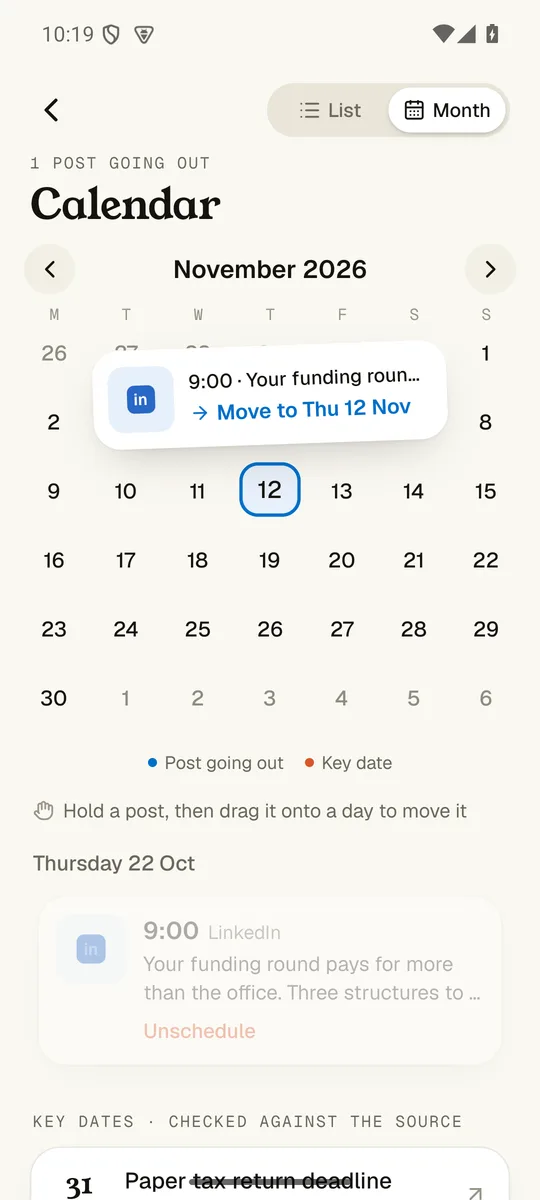
Opening the calendar
Open the calendar, hold a post and drag it to a new day. The key dates for your clients are on there too.
Everything in the appWalk me through it.
1. List or month
Flip between the week ahead and the whole month.
2. Drag to move
Hold a post and drop it on a new day. It tells you where it landed.
3. Key dates built in
Tax and filing deadlines sit alongside, each checked against its source.
What else can it do?
Does anything go out without me?
Nothing goes out until you tap.
The app drafts, checks and lines things up. Only you can press the button that posts.
Screens show Hartley & Co, a made-up demo firm.